Customizing a Risk Assessment Popup

Today’s article is all about customizing a Change Risk Assessment pop-up that needs to appear in Service Operations Workspace. We’ll have to create a custom UI action, a custom UI page, insert a bunch of Jelly code, and define a data source for the content we want to add. Before we dig in, compare our starting and ending state.
This is what our risk assessment popup looks like OOTB:
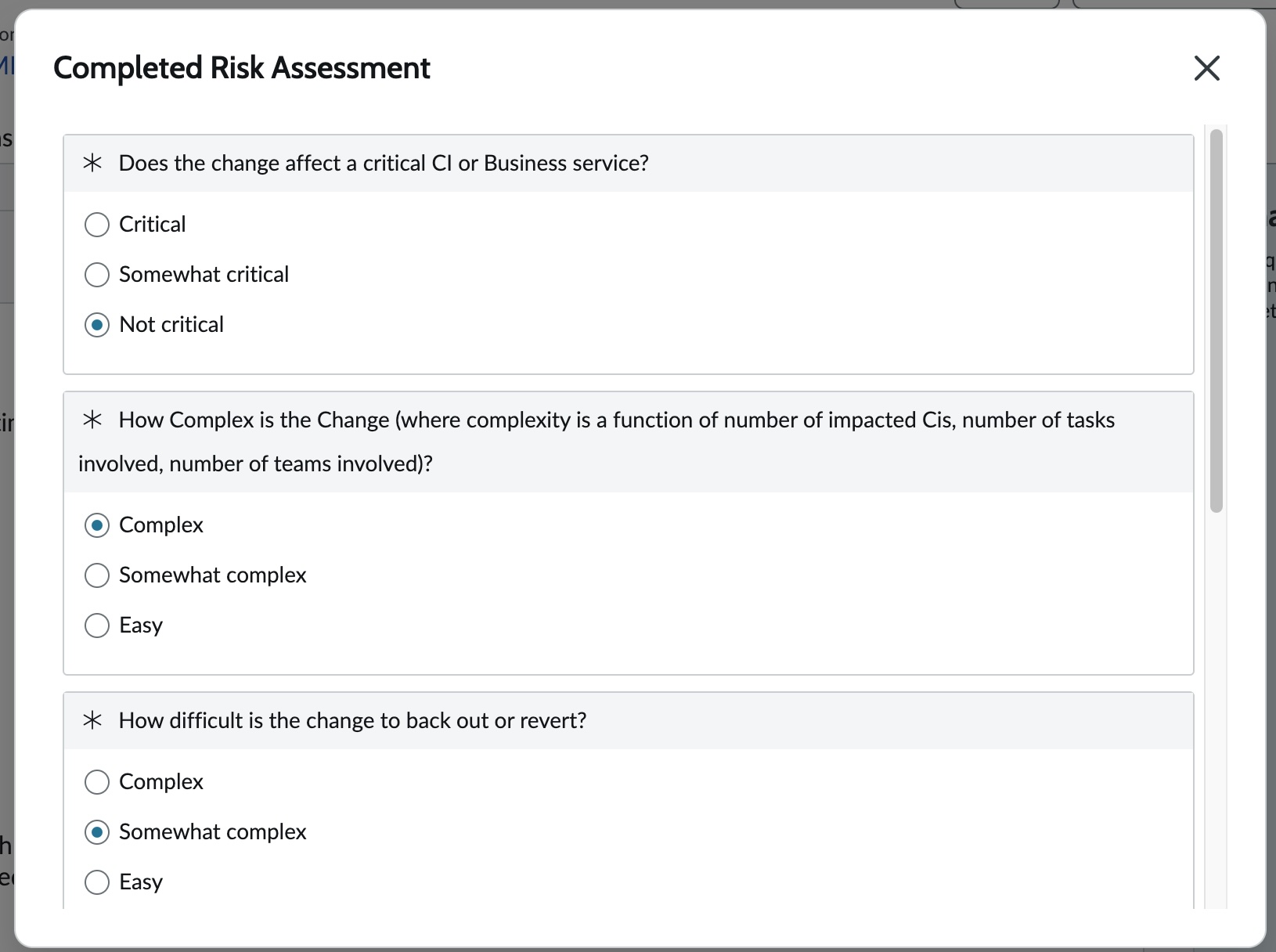
And this is what we want to achieve:
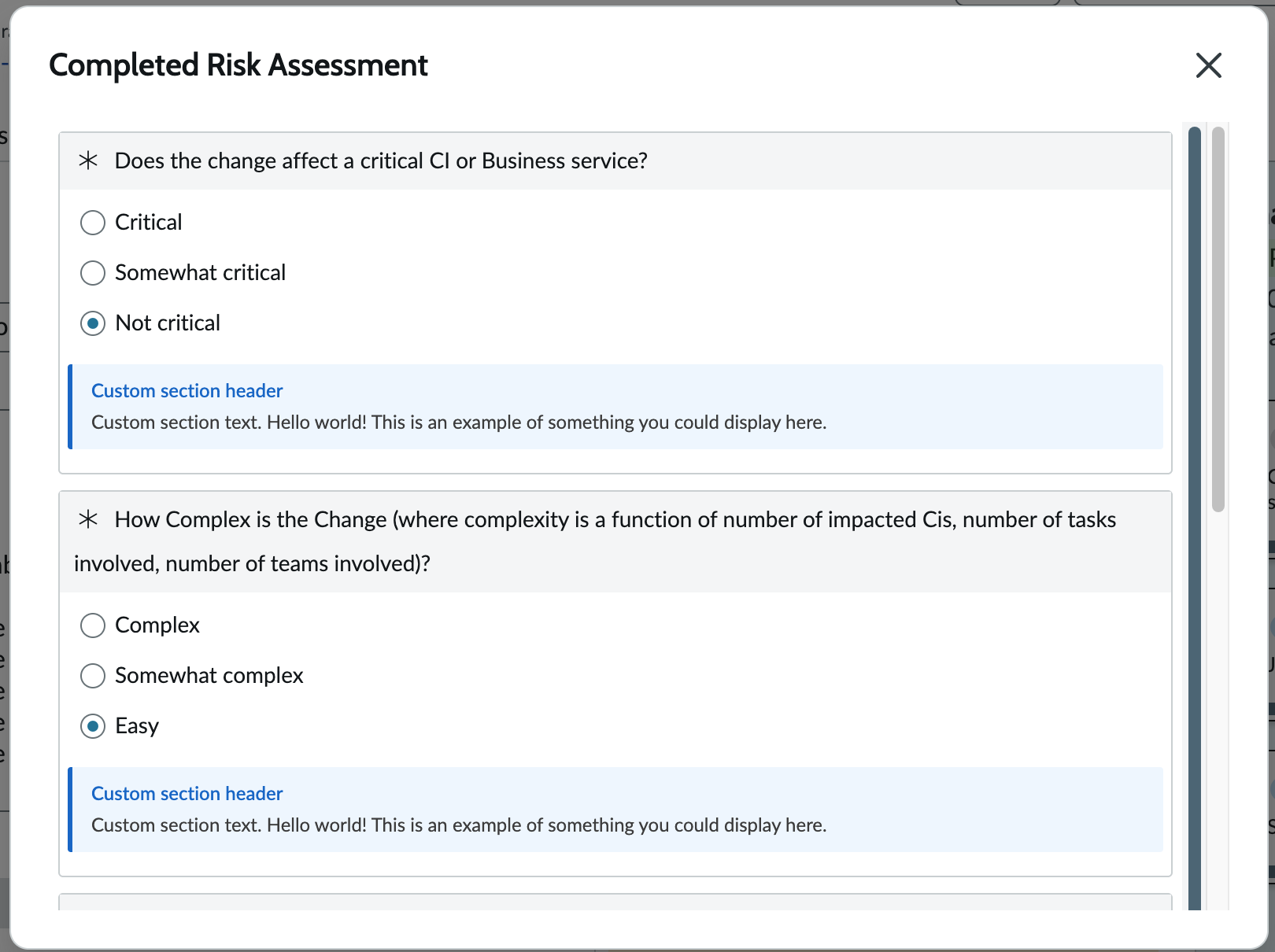
I (biased) think this looks great: it cleanly shows the additional information that we want it to. For some context, in this use case, we’re having an AI Agent submit a risk assessment, and we want to track the custom section behind its decisions. Let’s talk through this data piece real quick.
Where does the data live?
Assessments are tricky in nature because they span multiple tables and are related through references. But every completed assessment will live on the Assessment instance question [asmt_assessment_instance_question] table. And fortunately, there’s a big ol’ string field called Additional Information that lives on that table by default. So in our use case, we’re going to be pulling data from that field. That’s the field that our AI Agent will track its reasoning in:
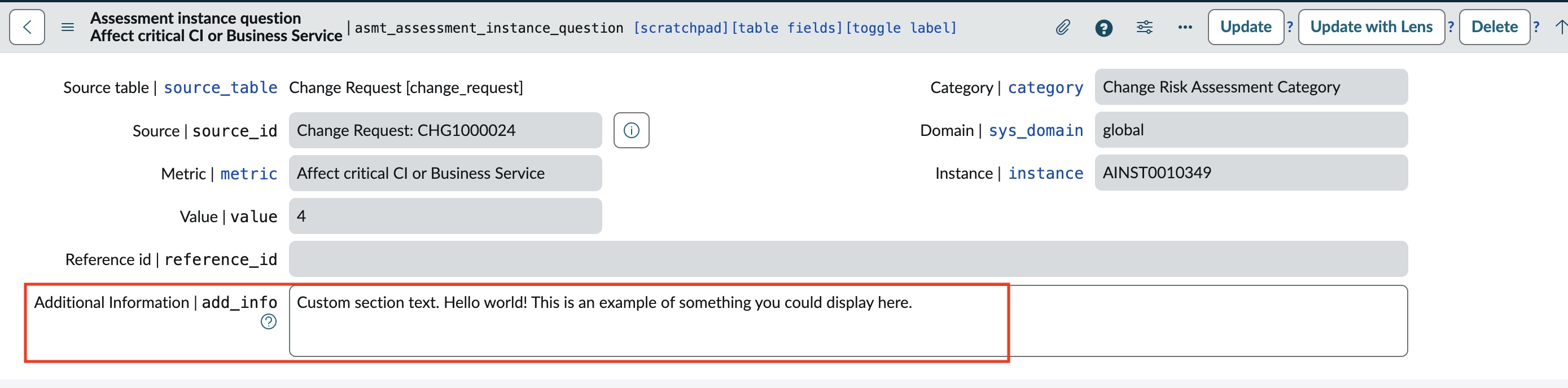
With that established, we can jump in. Let’s start with our UI action.
Setting up our UI action
There’s already an OOTB UI action called Risk Assessment (sys_id: 8d300156d7033200532c24837e6103e8), but it’s a high risk file and lives in the Global scope. For my use case, I duplicated this UI action to my own scope, and changed the name to View Risk Assessment. I modified a few of the checkboxes at the top (e.g. turning off Form Link) of the UI action screen since I don’t need them to interfere with the OOTB action.
To get this thing to work in Service Operations Workspace (or any Workspace for that matter), you need to check the box for Workspace Form Button and Format for Configurable Workspace. You’ll then need to add some content into the Workspace Client Script field.
Below is the script I pasted into that field. I pulled this script from a Community post. There’s another Community post from a few years prior, which has a shorter script within it, that may work for your particular use case.
Workspace client script for my custom UI action
function onClick(g_form) {
   invokeAssessment();
}

function invokeAssessment() {
    g_form.hideAllFieldMsgs();
    if (g_form.isUserModified()) {
        handleDirtyForm();
    } else {
        var changeRequestSysId = g_form.getUniqueValue();
        var tableName = g_form.getTableName();
        var ga = new GlideAjax("ChangeRiskAsmtAjax");
        ga.addParam("sysparm_name", "invokeAssessmentAjax");
        ga.addParam("sysparm_id", changeRequestSysId);
        ga.addParam("sysparm_class", tableName);
        ga.getXMLAnswer(function(answer) {

            answer = JSON.parse(answer);
            if (!answer.hasAsmt)
                g_form.addInfoMessage(getMessage("There are no risk assessments defined for this Change Request"));
            else {
                if (answer.asmtComplete)
                    handleCompletedAsmt();
                else {
                    var asmtInstanceSysId = answer.asmtInstanceSysId;
                    var changeRiskAsmtSysId = answer.changeRiskAsmtSysId;
                    var changeRequestSysId = answer.changeRequestSysId;
                    var riskAsmtName = answer.riskAsmtName;
                    handleAsmt(asmtInstanceSysId, changeRiskAsmtSysId, changeRequestSysId, riskAsmtName);
                }
            }
        });
    }
}

function handleDirtyForm() {
    var msg = getMessage("Do you want to save changes to " + g_form.getValue("number") + " before leaving this page?");
    g_modal.confirm(getMessage("Confirmation"), msg, function(confirmed) {
        if (confirmed) {
            g_form.save();
        }
    });
}

function handleCompletedAsmt() {
    var msg = getMessage("You have already completed the risk assessment. Would you like to edit your existing risk assessment?");
    g_modal.confirm(getMessage("Confirmation"), msg, function(confirmed) {
        if (confirmed) {
            var changeRequestSysId = g_form.getUniqueValue();
            var tableName = g_form.getTableName();
            var ga = new GlideAjax("ChangeRiskAsmtAjax");
            ga.addParam("sysparm_name", "copyAssessmentAjax");
            ga.addParam("sysparm_id", changeRequestSysId);
            ga.addParam("sysparm_class", tableName);
            ga.getXMLAnswer(function(answer) {

                answer = JSON.parse(answer);
                if (!answer || !answer.hasAsmt)
                    g_form.addInfoMessage(getMessage("There are no risk assessments defined for this Change Request"));
                else {
                    var asmtInstanceSysId = answer.asmtInstanceSysId;
                    var changeRiskAsmtSysId = answer.changeRiskAsmtSysId;
                    var changeRequestSysId = answer.changeRequestSysId;
                    var riskAsmtName = answer.riskAsmtName;
                    handleAsmt(asmtInstanceSysId, changeRiskAsmtSysId, changeRequestSysId, riskAsmtName);
                }
            });
        }
    });
}

function handleAsmt(asmtInstanceSysId, changeRiskAsmtSysId, changeRequestSysId, riskAsmtName) {
    /* asmtUiPage updated to custom UI page to display custom section. Previous value (OOTB) is commented on next line. */
    var asmtUiPage = "custom_assessment_page"; //"assessment_take2";
    var url = asmtUiPage + ".do";
    url += "?sysparm_assessable_sysid=" + asmtInstanceSysId;
    url += "&sysparm_assessable_type=" + changeRiskAsmtSysId;
    url += "&sysparm_hide_header=true";
    url += "&sysparm_hide_save=true";
    url += "&sysparm_hide_cancel=true";
    url += "&sysparm_hide_source_details=true";
    url += "&sysparm_stack=no";
    url += "&sysparm_return_url=" + getEncodedUrl(changeRequestSysId, asmtInstanceSysId);

    g_modal.showFrame({
        url: url,
        title: 'Completed Risk Assessment',
        size: 'lg',
        height: 1000
    });
}

function getEncodedUrl(changeRequestSysId, asmtInstanceSysId) {
    var closeUiPage = "change_risk_asmt_close_dialog";
    var url = "/" + closeUiPage + ".do";
    url += "?sysparm_stack=no";
    url += "&sysparm_id=" + changeRequestSysId;
    url += "&sysparm_asmtInstanceSysId=" + asmtInstanceSysId;
    return encodeURIComponent(url);
}asmtUiPage in the function handleAsmt. If you copied my code, you’ll notice this is already done (it’s set to custom_assessment_page). If you copied from Community, you’ll likely see assessment_take2, which is the OOTB Change Risk Assessment UI page.Now that we’ve created this UI action, we can move on to the next step.
Setting up the UI page
I’m starting out with the OOTB UI Page assessment_take2 (sys_id: 012918babfb001007a6d257b3f073996). This, like the UI action, is a high risk file that lives in Global scope. I’m cloning it in the Global scope because of a function called GlideMobileExtension, which can’t be called from a scoped app. I have tested commenting out all of the references to GlideMobileExtension but unfortunately, a scoped UI page fails to render. Therefore, if you want to try doing this in a scoped app… I don’t have the answer for you.
As for the record itself: pick a name for what you want this UI page to be called. In this example, I’ve gone with custom_assessment_page. I also updated the Description field for documentation purposes. Everything else (outside of the code, which we’ll go over below) I left untouched. By everything else… just keep Direct unchecked.
Code change: HTML
Alright, so in the HTML field, we need to add some content to display our custom little section. After line 654, I’m adding this block in:
UI page HTML script updates
<!-- Custom section: Query add_info with question and answer context -->
<g2:evaluate jelly="true">
    var addInfoMap = {};
    var aiq = new GlideRecordSecure('asmt_assessment_instance_question');
    aiq.addQuery('instance', jelly.jvar_assessable_sysid);
    aiq.addNotNullQuery('add_info');
    aiq.addQuery('add_info', '!=', '');
    aiq.addQuery('is_hidden', false);
    aiq.query();
    while (aiq.next()) {
        var entry = {};
        entry.add_info = aiq.getValue('add_info');
        entry.question = aiq.getDisplayValue('metric');
        entry.value = aiq.getValue('value');

        // Resolve the numeric value to the answer display label
        var metricId = aiq.getValue('metric');
        var md = new GlideRecord('asmt_metric_definition');
        md.addQuery('metric', metricId);
        md.addQuery('value', aiq.getValue('value'));
        md.setLimit(1);
        md.query();
        if (md.next()) {
            entry.answer_display = md.getValue('display');
        } else {
            entry.answer_display = aiq.getValue('value');
        }

        addInfoMap[aiq.getUniqueValue()] = entry;
    }
    var addInfoMapJSON = new global.JSON().encode(addInfoMap);
</g2:evaluate>
<script>
    var additionalContentData = {};
    try {
        additionalContentData = JSON.parse('$[JS:addInfoMapJSON]');
    } catch(e) {}
</script>
Line 695-ish should now be a </div> statement followed by </j:if> on the next line.
add_info field on the Assessment instance question [asmt_assessment_instance_question] table. We’re leveraging some of the already-established variables (like jelly.jvar_assessable_sysid) to confirm we’re looking at the right add_info.Code change: Client script
At the base of our client script, we’ll just add a little bit of jazz. In my use case, if my add_info field is empty, I don’t need to see an empty blue box. So after line 714, I added this blurb:
UI page Client script updates
// Custom section: Inject add_info inside the question tbody
addLoadEvent(function() {
    if (typeof additionalContentData === 'undefined' || !additionalContentData) return;

    for (var qId in additionalContentData) {
        if (!additionalContentData.hasOwnProperty(qId)) continue;
        var data = additionalContentData[qId];
        if (!data || !data.add_info) continue;

        // Find the label row for this question
        var labelRow = gel('label_ASMTQUESTION:' + qId);
        if (!labelRow) continue;

        // The label row is a tr inside a tbody - insert a new tr before the last empty tr
        var tbody = labelRow.parentNode;
        if (!tbody || tbody.tagName.toLowerCase() !== 'tbody') continue;

        var customSectionRow = document.createElement('tr');
        customSectionRow.className = 'custom-section-row';

        var customSectionCell = document.createElement('td');
        customSectionCell.setAttribute('colspan', '2');

        var infoDiv = document.createElement('div');
        infoDiv.className = 'custom-section-info';
        infoDiv.setAttribute('data-question-id', qId);
        infoDiv.style.cssText = 'padding: 8px 12px; margin: 0; background-color: #f0f7ff; border-left: 3px solid #0070d2; font-size: 12px; line-height: 1.5; color: #444; border-radius: 2px;';

        var headerSpan = document.createElement('span');
        headerSpan.style.cssText = 'font-weight: 600; color: #0070d2; display: block; margin-bottom: 2px;';
        headerSpan.textContent = 'Custom section header'; // Modify to whatever you want the title to be

        var textDiv = document.createElement('div');
        textDiv.textContent = data.add_info;

        infoDiv.appendChild(headerSpan);
        infoDiv.appendChild(textDiv);
        customSectionCell.appendChild(infoDiv);
        customSectionRow.appendChild(customSectionCell);

        // Insert before the last tr in the tbody (the empty spacer row)
        var lastRow = tbody.lastElementChild;
        tbody.insertBefore(customSectionRow, lastRow);
    }
});headerSpan.textContent.Code change: Processing script
There’s none! Woohoo!
Linking it all together
We’ve set up our UI page, our UI action, and we now want to pull data directly from that Assessment instance question [asmt_assessment_instance_question] record. So we should be all set. All we need to do now is submit an assessment and ensure that at least one of the questions has add_info populated. Remember, based on the logic of the client script, if that field is empty, the blue box won’t display.
Troubleshooting
A few things tripped me up while I was working through this:
Are you working in the right client script field? Make sure you are working on the Workspace Client Script! I spun my head in circles because I was making edits to the legacy script field.
If you’re using a scoped UI page, try testing out the endpoint of your UI page directly from its record. This will give you a hint on if you have any errors. For instance, this is how I found out that there’s a
GlideMobileExtensionfunction that can’t be called from a scoped app.